Context
My goal with this post is to distill the complicated topic of crypto taxes into an actionable tutorial I wish I had myself. It will hopefully make things easy for you and set you on the right track. At the very least, there are many practical tips and tricks that I’m sure you’ll find useful.
I’ll be using and shilling Google Sheets, which I can’t recommend enough. I began to appreciate the power of spreadsheet programs only after haplessly attempting to track my crypto portfolio with scripts written in Rust. For your own mental health, start with a simpler project if you want to learn Rust.
Before we get the ball rolling, a caveat: I’m not a tax adviser, nor a lawyer, so this isn’t qualified advice. I’m not liable for any errors in your tax report.
Target Audience
While this guide should be applicable to most blockchains, it is focused on Ethereum and Decentralized Finance.
If you did any of the following with your ETH or ERC20s:
- Exchanged them for fiat or for one another
- Earned them as work income
- Supplied them to various lending protocols
Follow along! This guide is for you, the DeFi power user.
Prerequisites

Jurisdiction
You have to be aware that crypto taxes differ significantly based upon the jurisdiction.
At the time of writing this post, most tax authorities offer incomplete documentation, which is why I decided to follow the guidance published by HMRC, UK’s tax collection body. It’s clear, logical and cohesive.
Yet, this is not a UK-specific guide. Since most tax authorities don’t cover DeFi, you are left with either no model or the UK model. I chose the latter.
To ensure that in some unique circumstances it’s okay to follow the guidance provided by an overseas state, contact a tax adviser familiar with your local jurisdiction. In some places like Portugal, capital gains on cryptos aren’t even taxed.
The Almighty Taxable Event
The core ingredient of your tax report is the “taxable event”. Pretty much anything that you do with your cryptos is considered a taxable event:
- Buy or sell ETH for fiat on exchanges like Coinbase
- Buy or sell ETH for ERC20s on exchanges like Kyber
- Supply and withdraw money to and from lending protocols like Compound
- Supply and withdraw liquidity to and from liquidity pools like Uniswap
- Buy, sell or underwrite options on exchanges like Opyn
- Get paid in crypto using tools like Sablier or Gitcoin
A notable exception is when you borrow money against your crypto collateral - this is not a taxable event. However, any ETH you paid as gas is treated as a disposal of ETH, hence a taxable event.
Data
The most important data to get hold of are the historical prices for all of 2020. This is faster than manually getting the rates for each date you traded on (hint: you probably traded on a helluva lot of dates). Here’s what you need:
- Close price at the end of the day on GMT of the fiat currencies you traded cryptos for, if these currencies are not the same with the fiat currency that is legal tender in your jurisdiction.
- Close price at the end of the day on GMT of the cryptos you traded the most, except for ETH or BTC counterparties. Having the ETH and BTC price in USD is sufficient.
- The rates for all other cryptos that you earned as income once and for which having a full-year table would be superfluous.
Why use the close price on GMT and not something else? Well, it’s an easy and coherent way to account for the fair market value of your cryptos. Except for fiat or stablecoin trades, you can’t get accurate data for the exact hour and minute of your taxable event - the daily price is the best that you can get.
Spreadsheets
Here they are:
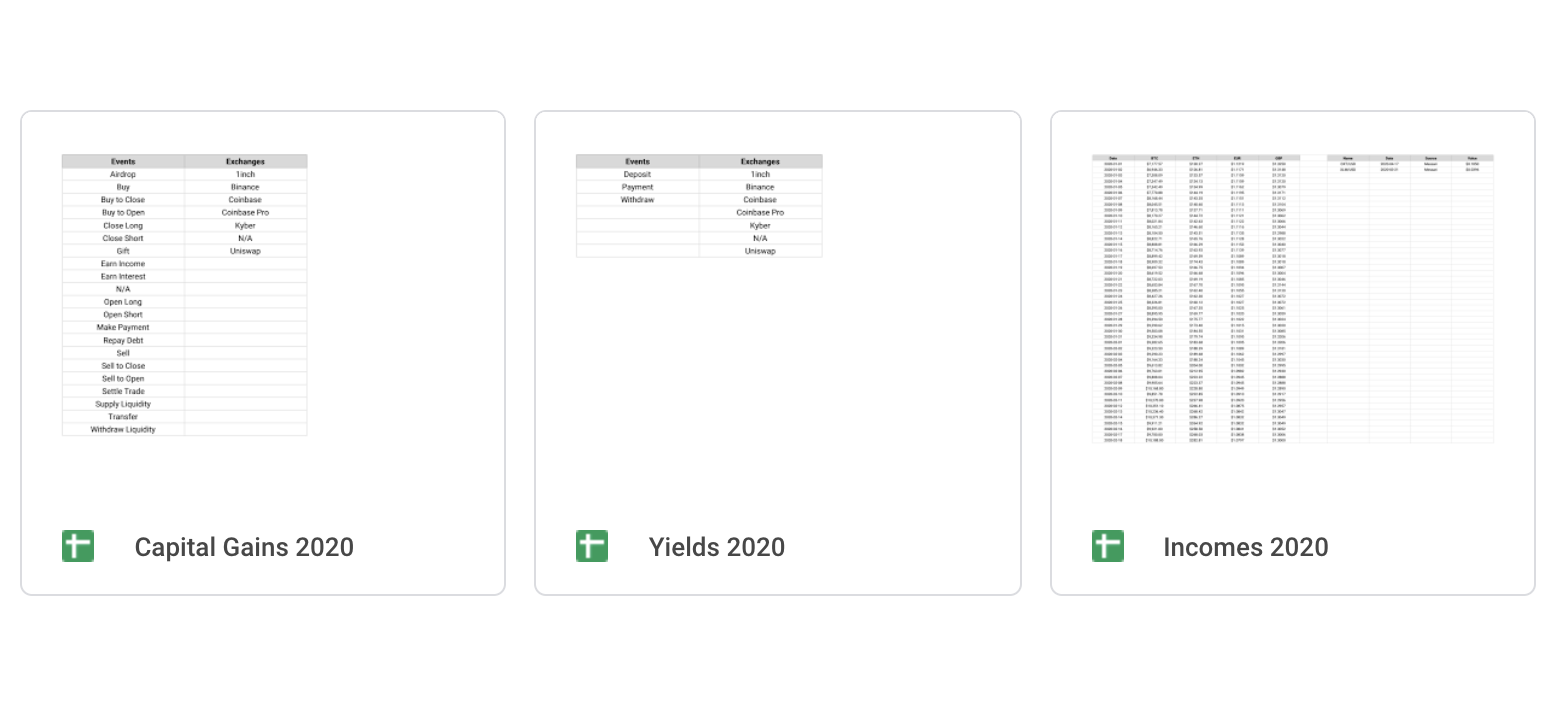
Feel free to fork, modify and use them as you please. I distributed them under the MIT license. In each spreadsheet that ends with 2020, there are three common sheets:
- Enums
- Rates
- Totals
Let’s first look at what these are.
Enums
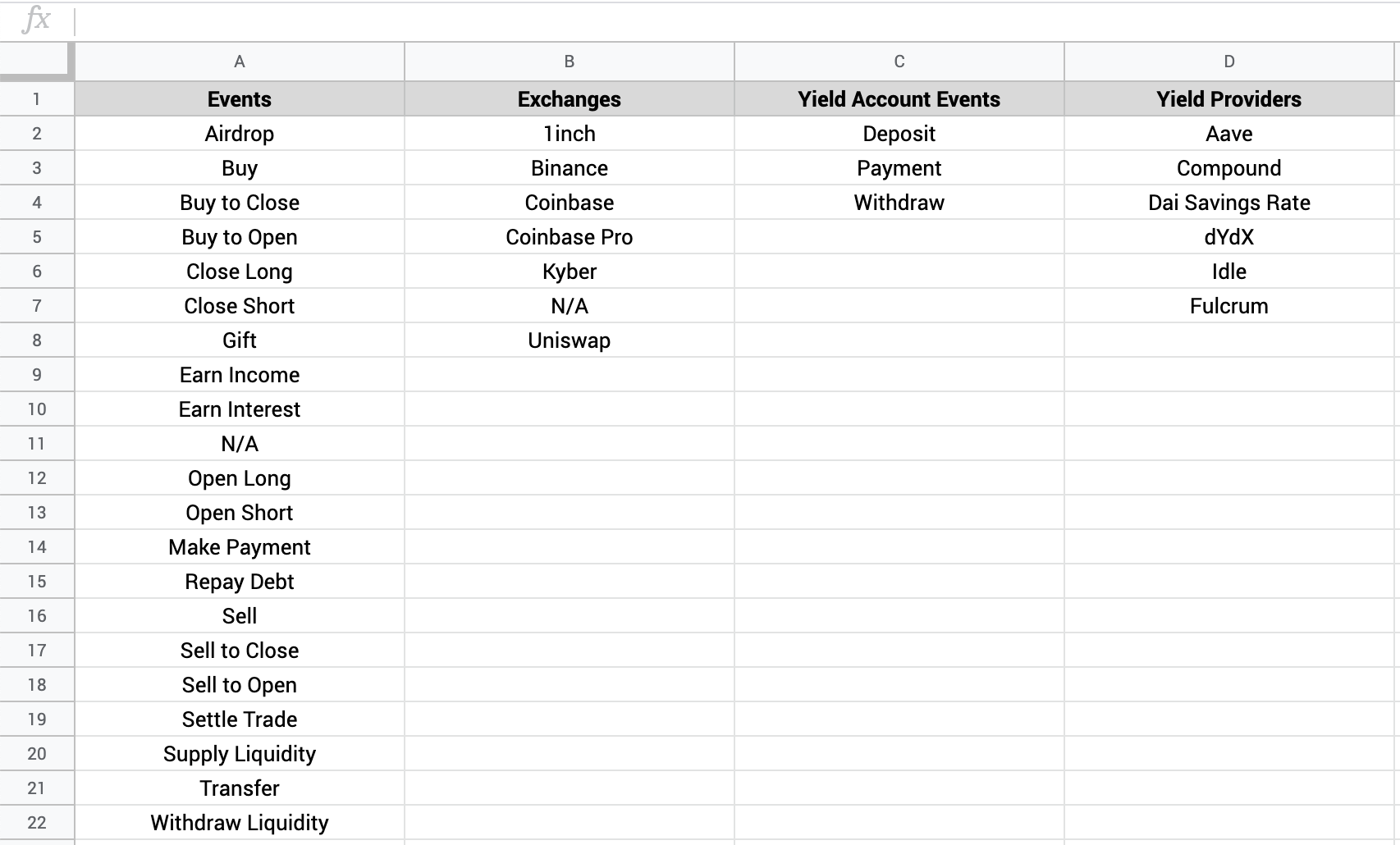
The Constants spreadsheet contains four columns of pre-defined values, or “enums”. To be honest, you could very well track your cryptos in Google Sheets without this feature, but your sheets become more reliable when you confine the value a cell can have to one of the values from these enums.
In each of the other spreadsheets, there is an “Enums” sheet that uses the following two functionalities to pull the data from the Constants spreadsheet:
In any sheet with an “Event”, “Exchange” or “Yield Provider” column, there is a data validation rule to ensure that the cell can’t have a value other than the one from the Enums sheet.
Rates
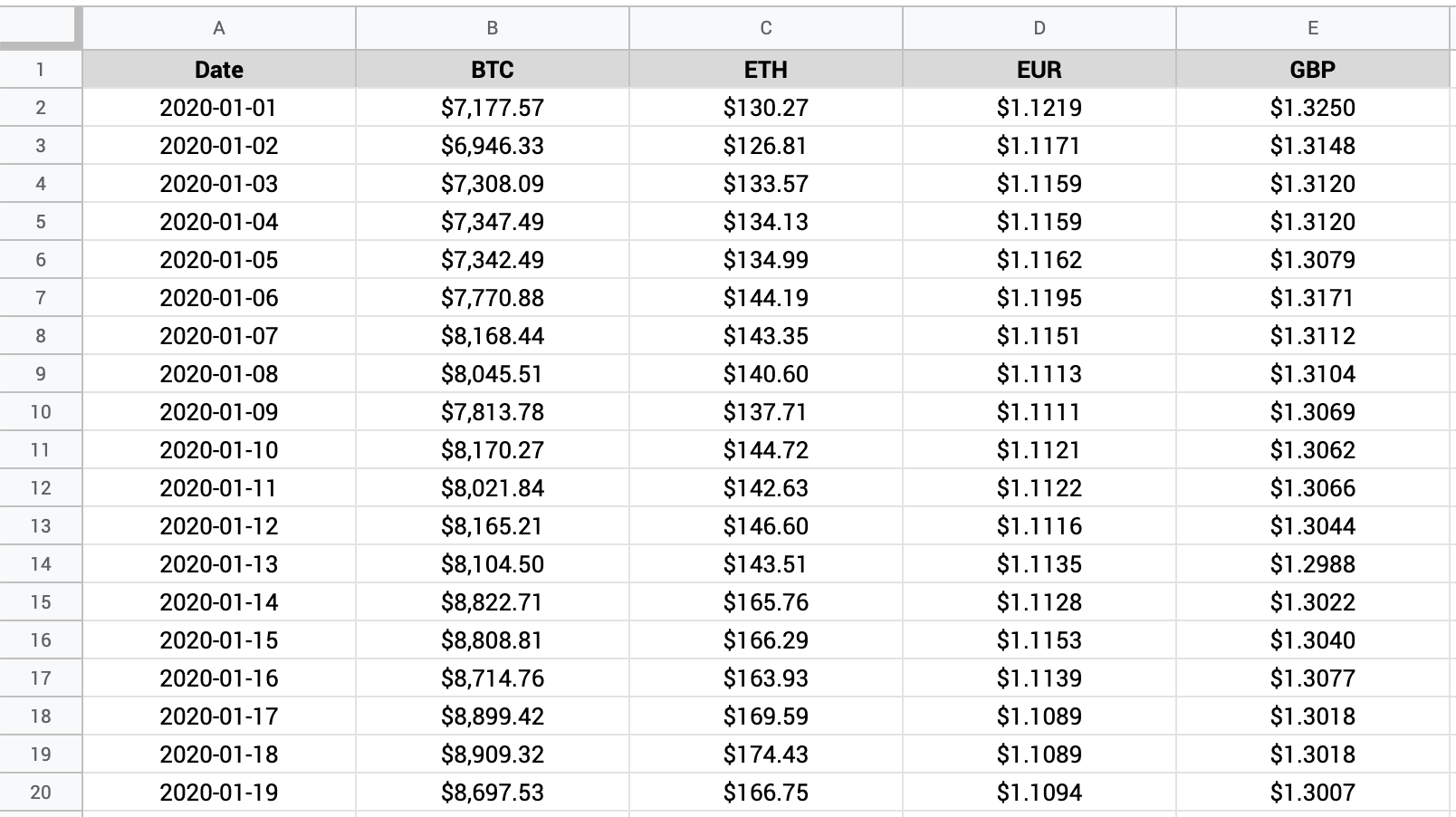
This is a sheet that uses the following three functionalities to pull the price data for the full year:
- GOOGLEFINANCE
- QUERY to filter only the price data from everything returned by GOOGLEFINANCE
- Named ranges, just like in Enums
- RATE_DATES
- BTC_RATES
- ETH_RATES
- EUR_RATES
- GBP_RATES
The final result is a table with 5 columns and 367 rows, which contains all the price data needed for your calculations. You’ll see the BTC, ETH, EUR and GBP rates in USD for the whole year. Depending on your circumstance, you may want to change the base fiat currency and add or remove more columns.
Totals
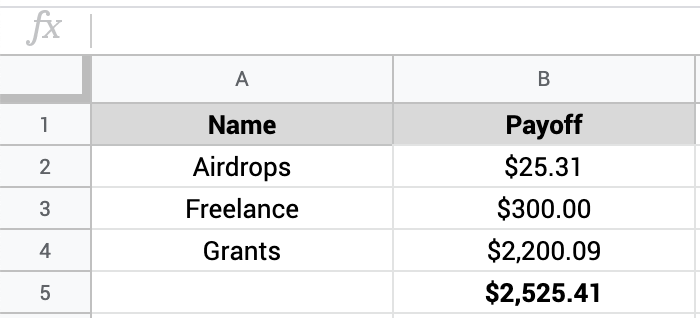
This is as easy as it sounds. The “Totals” sheet is like a receipt of that spreadsheet, summing up the results from all categories and assets tracked in there.
Incomes
This is where you keep track of all cryptos earned in exchange for your labour. Besides the common sheets, you’ll see:
- Airdrops
- Grants
- Freelance
The calculation rules are the same for each category, so let’s take an arbitrary example and see how it works for “Freelance”.
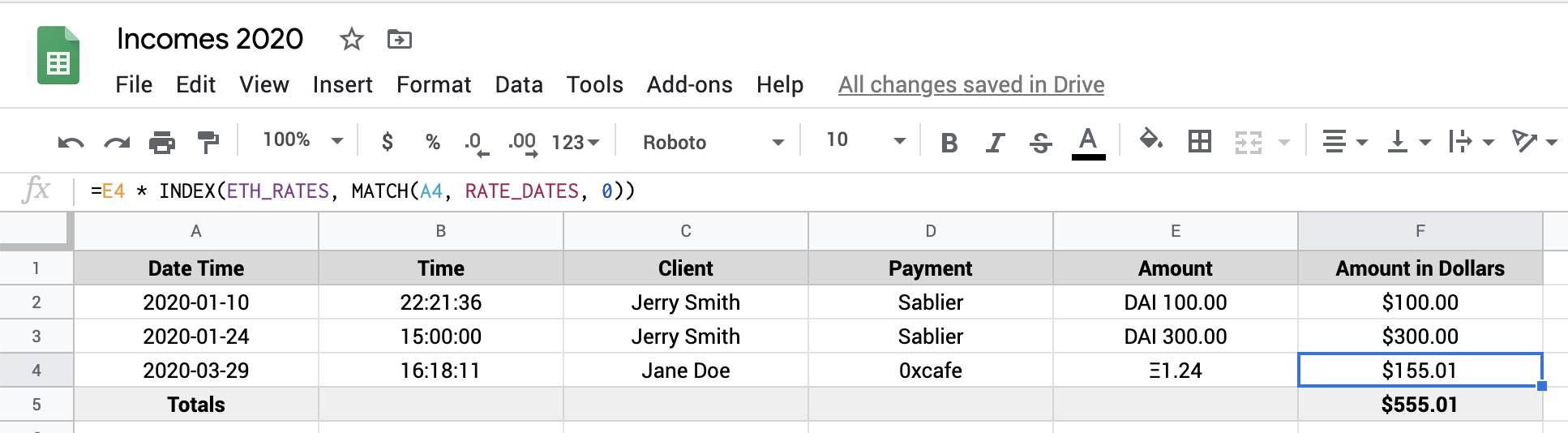
The DAI trades are easy, because you can safely substitute DAI, USDC and most stablecoins with $1. But how do you calculate the fiat value when someone pays you in a fluctuating asset like Ether?
Say you worked on a Gitcoin bounty and received 1.24 ETH on March 29, 2020. You take the received amount and multiply it by the following formula, which gets you the price of ETH in USD at the end of the day on the GMT timezone:
INDEX(ETH_RATES, MATCH(A4, RATE_DATES, 0))
This is effectively looking up the rates table for the ETH price in USD that corresponds to the date on the current row (A4). To learn more about INDEX and MATCH, refer to this tutorial. They are two very powerful functions to be aware of.
After you apply the same algorithm to all airdrops, grants and freelance activities, head to the “Totals” sheet to compute the total fiat value of your crypto earnings.
That’s it for incomes. Let’s continue with yields.
Yields
This is a spreadsheet dedicated exclusively to interest earned from supplying money to lending protocols like Compound, dYdX, Aave or DSR.
Besides the common sheets, you’ll see:
- Compound DAI
- Compound ETH
The thing with lending in DeFi is that it’s ultra short-term. You can supply money now and withdraw the principal plus a bit of interest one hour later, which begs the question: how do you build a cogent system that tracks your returns?
Simple! You keep a record of all deposits and withdrawals.
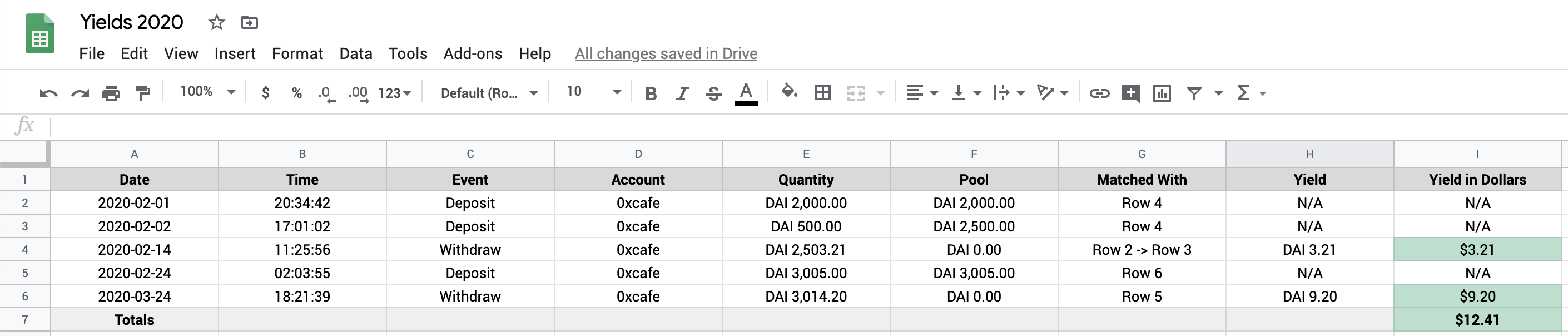
Open the “Compound DAI” sheet and look at the first three rows:
- Deposit 2000 DAI on Feb 1
- Deposit 500 DAI on Feb 2
- Withdraw 2503.21 DAI on Feb 14
The net gain is 2503.21 - (2000 + 500) = 3.21 DAI, or approximately $3.21.

Now, open “Compound ETH” and apply the same rules, knowing that you need the ETH price in USD from the rates table. You once again use the INDEX and the MATCH functions in combination with the named ranges.
You finally head the “Totals” sheet and compute the total fiat value of your crypto yields, and that’s it for interest and lending protocols. Let’s continue with capital gains, the mightiest of them all.
Capital Gains
Nomenclature
What exactly are “capital gains”?
Most tax authorities demand that you pay tax when you sell cryptos that appreciated in fiat value since you last bought it. It’s the difference between what you received, the “proceeds”, between what you paid when you entered the trade, the “cost basis”.
Of course, if the different is negative, you can offset losses against future gains.
Accounting
How do you match transactions if you traded a lot? In what order?
You may want to read about FIFO, LIFO and WAV. These are systems of inventory accounting and each tax authority demands that you use either any or precisely one of them.
Heads up! In the UK, your cost basis may is different if you bought your cryptos on the same day or within 30 days after you sold them.
Google Sheets
Besides the common sheets, you’ll see:
- BAT
- ETH
- KNC
- UNI-ETH-USDC
There’s a sheet for each of two ERC20 tokens, ETH itself and the UNI-ETH-USDC token that represents shares in a Uniswap pool.
The rules embedded in this spreadsheet are complex, so I highly recommend you open it and study
its dynamics closely. It’s easier if you activate the “Show formulas” mode, either from the menu bar under “View” or by
tapping CTRL and ~ simultaneously.
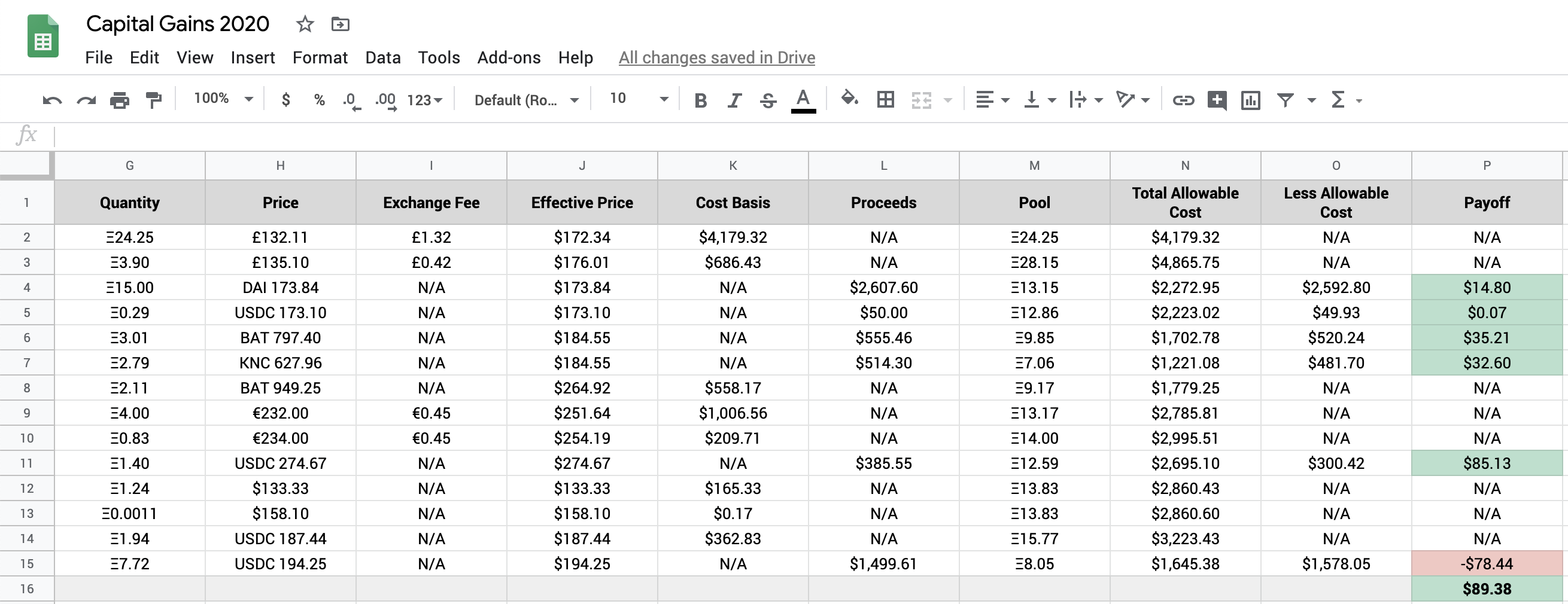
Here are the highlights:
- I used the WAV accounting system, but you may need to use something else
- The ETH in the Incomes and Yields spreadsheet is linked here as an event analogous to a “buy” trade
- Exchange fees paid in fiat are added to the cost basis or subtracted from the proceeds
- Network fees (“gas”) are added to the amount of ETH sold or subtracted from the amount bought (refer to this tweet)
- ETH-to-ERC20 transactions are accounted for twice: in the ERC20 sheet and also in the ETH sheet
- When the time is before 12pm, the close price is from the previous day
Bonus Tips
TokenSets
If you invest in ETH via TokenSets, know that sets are ERC20s, so you can track them as ordinary tokens in the Capital Gains sheet. See ETH20SMACO as an example.
Opyn
If you trade options on exchanges like Opyn, I recommend tracking them in a different spreadsheet, lest the Capital Gains spreadsheet clogs up with formulas.
Exception: the ETH premiums earned by underwriting options should still be linked in the “ETH” sheet.
Alternatives
If you didn’t like my DYI methodology or Google Sheets is not your cup of tea, rest assured that there are alternatives. I can personally recommend two products: Koinly and CoinTracker, owing to their good customer support. Neither of these products worked for me because I interacted with DeFi protocols not supported by them, but maybe your situation is different.
Wrap-Up
Thanks for reading! I hope this helped you. You can find all spreadsheet templates in this GitHub repo.
Needless to say, the data used in these spreadsheets are not my personal financial data. Everything is fabricated.
Ping me on Twitter if you want to chat. I’m open to comments, suggestions and ideas.